Introduction | Next.js
Welcome to the Next.js Documentation.
nextjs.org
Next란?
Next는 폴더를 사용해서 라우트를 정의하는 파일 시스템 기반의 라우터입니다

app 폴더 => 루트 path 를 가리킨다.
하위 폴더는 다음 부터 URL path에 매핑 되는 걸 보여줍니다.
최상위 폴더 Root Segment
최하위 폴더 Leaf Segment
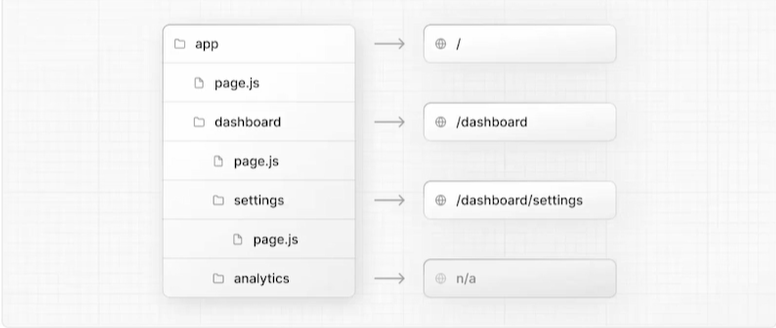
root path 접근 했을 경우 app폴더에 하위 page.js 가 보여지게 된다.
dashboard 접근 했을 경우 하위 page.js 보여지게 된다.
analytics 폴더에 하위 페이지가 없을경우 보여지는 페이지가 없다.(ex. 아래 이미지 참고)
아래는 dashboard 폴더안에 페이지가 존재하지 않으므로 404페이지 error 출력이 되고있다.


Next.js 설치 단계
PS C:\study\servelt\servlet\nextjs> npx create-next-app@latest
√ What is your project named? ... next-tutorial				프로젝트 이름
√ Would you like to use TypeScript? ... No / Yes  =>yes			TypeScript 사용여부
√ Would you like to use ESLint? ... No / Yes  =>yes			ESLint 사용여부
√ Would you like to use Tailwind CSS? ... No / Yes  =>yes		Tailwind CSS 사용여부
√ Would you like your code inside a src/ directory? ... No / Yes  =>NO 	src디렉토리
√ Would you like to use App Router? (recommended) ... No / Yes  =>yes   AppRouter 사용여부
? Would you like to use Turbopack for next dev? » No / Yes  =>yes	Turbopack 사용 여부
Next.js 실행단계(현재 14버전으로 공부함)
PS C:\study\servelt\servlet\nextjs> cd next-tutorial
PS C:\study\servelt\servlet\nextjs\next-tutorial> yarn dev
yarn run v1.22.22
$ next dev --turbopack
   ▲ Next.js 15.2.2 (Turbopack)
   - Local:        http://localhost:3000
   - Network:      http://192.168.0.84:3000

 ✓ Starting...
 ✓ Ready in 1711ms
프로젝트 있는 디렉토리 진입 후 yarn dev로 실행해 줍니다.
1. 수행단계
app/
│── layout.tsx      (루트 레이아웃)
│── page.tsx        (홈페이지 페이지)
│── dashboard/
│   ├── layout.tsx  (대시보드 레이아웃)
│   ├── page.tsx    (대시보드 페이지)
Next.js의 레이아웃 동작 방식은 Next.js 13이상에서는 app/layout.tsx 가 모든 페이지의 루트 레이아웃이 됩니다.
즉, app/layout.tsx 는 app/ 내부의 모든 하위 경로에 공통으로 적용 됩니다.
=> app/layout.tsx : 전역 레이아웃 역할
app/dashboard/layout.tsx 는 /dashboard에 대한 서브 레이아웃 역할 합니다
/dashboard에 들어가면 app/layout.tsx → app/dashboard/layout.tsx → app/dashboard/page.tsx 순서로 렌더링됩니다.
코드 실행 흐름 http://localhost:3000/dashboard
1. layout.tsx (루트 레이아웃)
export default function RootLayout({ children }: { children: React.ReactNode }) {
  return (
    <html lang="en">
      <body className={`${geistSans.variable}`}>
        루트레이아웃
        {children}   {/* 여기에서 dashboard/layout.tsx가 children으로 들어감 */}
      </body>
    </html>
  );
}
children이 dashboard/layout.tsx이므로 "루트레이아웃" 다음에 "대시보드 레이아웃"이 출력됨.
2. dashboard/layout.tsx (대시보드 레이아웃)
export default function DashboardLayout({ children }: { children: React.ReactNode }) {
  return <> 대시보드 레이아웃 " " {children}</>;
}
- 여기서 {children}은 현재 경로 /dashboard의 페이지 컴포넌트가 들어가는 자리입니다.
- Next.js는 자동으로 같은 경로(dashboard/) 내의 page.tsx를 찾아서 넣어줌.
- 여기서 children이 dashboard/page.tsx가 됨.
- 만약 dashboard/page.tsx에 "대시보드 페이지"가 있다면, 최종 출력은 다음과 같음
3. app/dashboard/page.tsx (대시보드 페이지)
export default function DashboardPage() {
  return <>대시보드 페이지</>;
}
/dashboard URL에 접근하면 Next.js는 dashboard/page.tsx를 자동으로 렌더링합니다.
최종 출력 결과
루트레이아웃
대시보드 레이아웃 " " 대시보드 페이지
이처럼 레이아웃이 중첩되면서 dashboard/layout.tsx가 layout.tsx의 children이 되고, dashboard/page.tsx가 dashboard/layout.tsx의 children이 됩니다.
그럼 어떻게
app/dashboard/layout.tsx (대시보드 레이아웃) 여기서
app/dashboard/page.tsx (대시보드 페이지) 여기로 어떻게 알고갈까?
Next.js의 자동 경로 매칭 방식
Next.js의 app 디렉토리 내부에서는 파일의 위치에 따라 자동으로 라우팅이 결정됩니다.
즉, dashboard/layout.tsx는 dashboard/ 경로에 대한 레이아웃이고, dashboard/page.tsx는 그 경로의 페이지입니다.